
How many businesses manage their customer queries, requests, tasks and communications on email? The answer: In the UK alone it is in the 100s of thousands!

Email works fine initially. However, as your business grows to manage all activities in email becomes almost impossible. How do you prioritise? How do you plan the work? How do you know what needs to be done and by when? How many times have you found the nightmare email that you have missed? How do you manage your service level agreements? How do you monitor and track your KPIs?
Customers will be much happier when you regularly communicate with them and keep them updated. This is where a ticketing tool (or CRM – Customer Relationship Management System) comes in.
There are many good ones out there. In this Case study, we have used Zendesk (one of the market leaders).
So who was the Customer and what did we do?
The customer was a gym with a very strong USP. They had plans to grow quickly and the vision was to have 2 gyms in every main town and city in the UK.
At the time of Smartech’s involvement, they had 5 gyms operating with a growth plan for another 3 within the next few months.
We approached the Gym with the below proposition:
Objectives:
- Conduct a series of diagnostic interviews with members of the Hub Team
- Review available data (KPI’s, Measures etc)
- Identify any themes/trends that are emerging by consolidating both the perception and empirical data collated
- Produce a report, outlining the findings and suggesting potential areas of focus
Specific areas of focus:
- Tasks expected to be delivered and their current duration
- Where and how can systems/technology improve productivity
- Does the team have the capacity to complete tasks within current levels of expectation
- How productive/efficient are the labour costs
A top level plan was developed and presented:

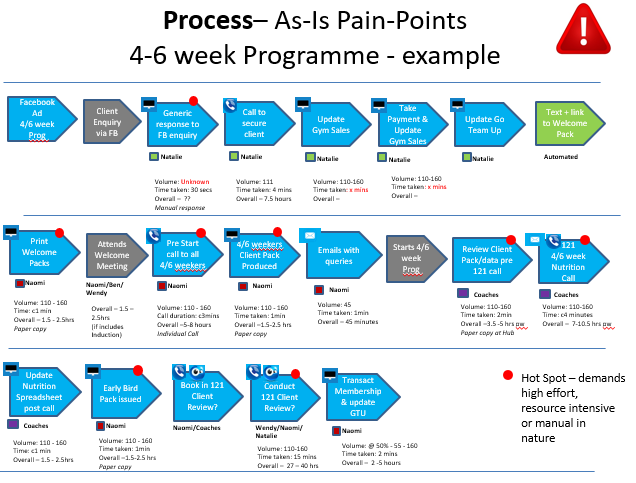
An as-is process review was carried out to ascertain what worked well and where pain points existed. This highlighted where improvements could be made. See examples below:

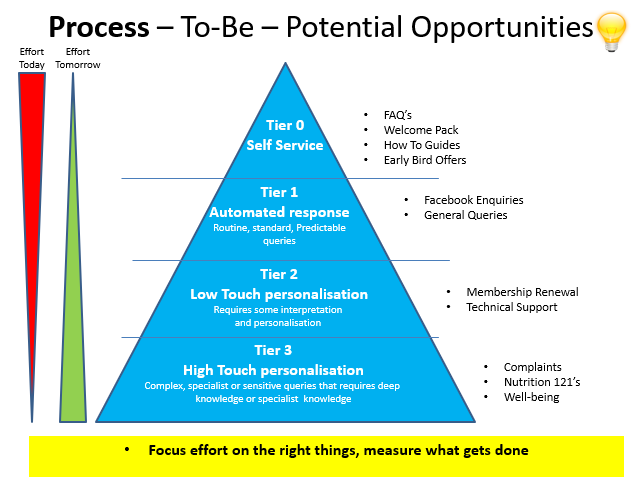
This resulted in the below model:
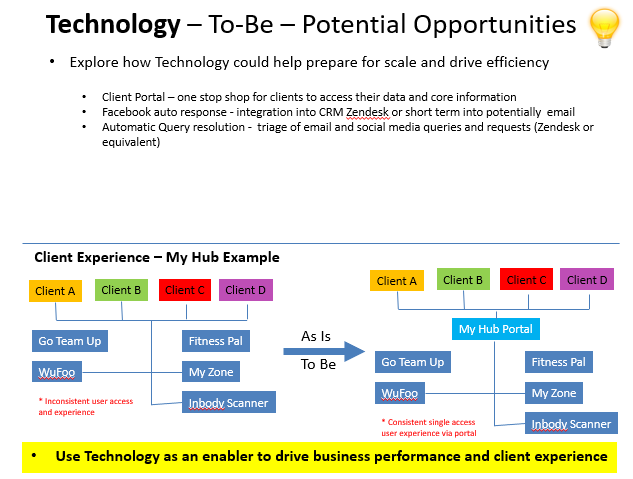
So the technology solution needed to deliver the following:
Zendesk Support Demonstration
At this point, we embarked on a 2 week trial with Zendesk to provide a demonstration of the solution. The key deliverables were to show:
- How emails come into Zendesk and how they are managed and processed
- How social media feeds come into Zendesk and how they are managed and processed
- How live chat can work and be responded to in Zendesk
- Portal and knowledge bank overview
- Agree what will be the categories for tickets/queries? e.g. nutrition, membership, classes, etc
- Overview of some of the reporting available
A warning with Zendesk Licensing! The trial will always default to their “Professional” version which contains a lot of excellent functionality. However, you may find you do not need all of it. We would suggest reviewing the various trail packages before you start. A summary can be found here https://www.zendesk.co.uk/support/compare/#compare
If you are in doubt start with the “Essential Plan” if you find you are missing core functionality you can always add functionality to the trial as you develop.
The demonstration took a few days to pull together and where possible we used real data. We linked into existing mailboxes to ensure we had real customer data. This was invaluable to ensure the demonstration was as representative as possible. Critically it also ensured the Gym key stakeholders could review/question/revisit the requirements. As expected the Gym decided to proceed with a full implementation.
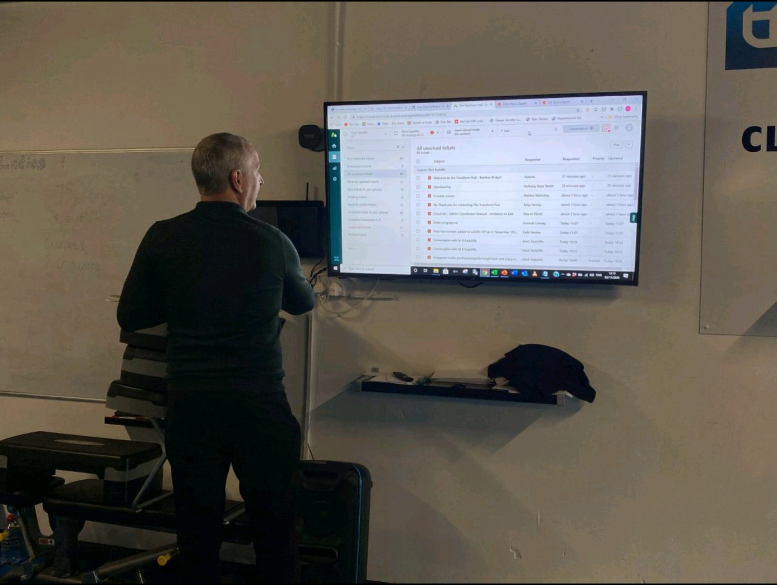
Zendesk Implementation
Whilst the demonstration had areas of development completed most if not all needed to be re-worked to ensure operation with the live systems. The activities carried out are detailed below:
- Zendesk Support configuration and view setup for SLA views and triggers
- Loading and configuration of Guide (knowledge bank) and loading of FAQs, Nutrition and Membership information and useful training material
- Investigating alternative solution to Zendesk Explore (reporting) Zoho Analytics
- The Gym was not willing to buy additional licenses for Zendesk Explore at this time. Note: It is vital you understand Zendesk licensing to ensure any business requirements can be covered by the subscription license package you chose
- Facebook and Chat setup via Social Media Add-on
- Building The Transform Hub Dashboard in Zoho Analytics including SLA dashboards (Note: Smartech already have a licensed version of Zoho Analytics therefore no further license charges were required)
- Configure chat on the Gyms websites
- Thorough end to end testing
The Implementation from start to finish took 3 weeks. This included various meetings and reviews. The major reason for such a quick delivery was the Gyms willingness to make decisions quickly and be very open to our suggestions based on years of experience.
At the time of writing the system has been live for 3 weeks without any issues.
So what was the cost?
The Zendesk licensing purchase was:
- Zendesk Support – Team subscription which is £15 per user per month (if purchased annually) or £20 per user per month (if purchased monthly) at the time of writing. “Team” was chosen as a minimum package to meet the immediate requirements. I would envisage the Gym to move to Professional within the next 6 months as it offers many additional features we believe would bring benefit
- Implementation – this was charged at an agreed day rate. We charged a total of 6 days.
What did the Management Reporting Look Like?
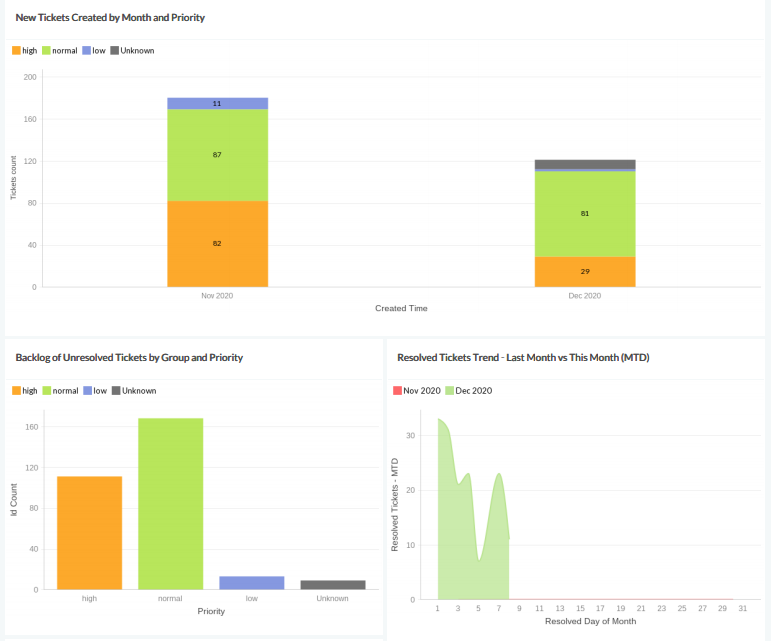
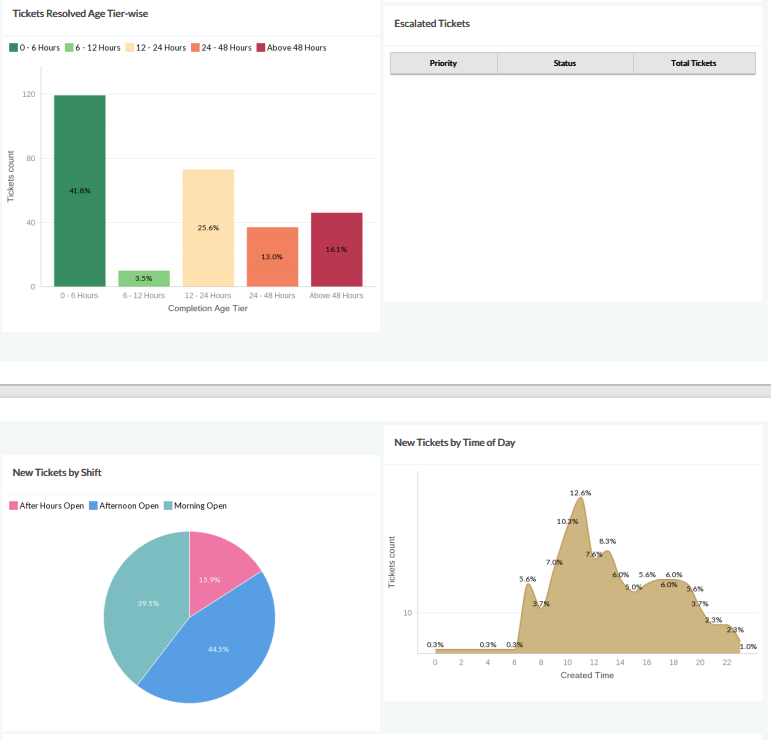
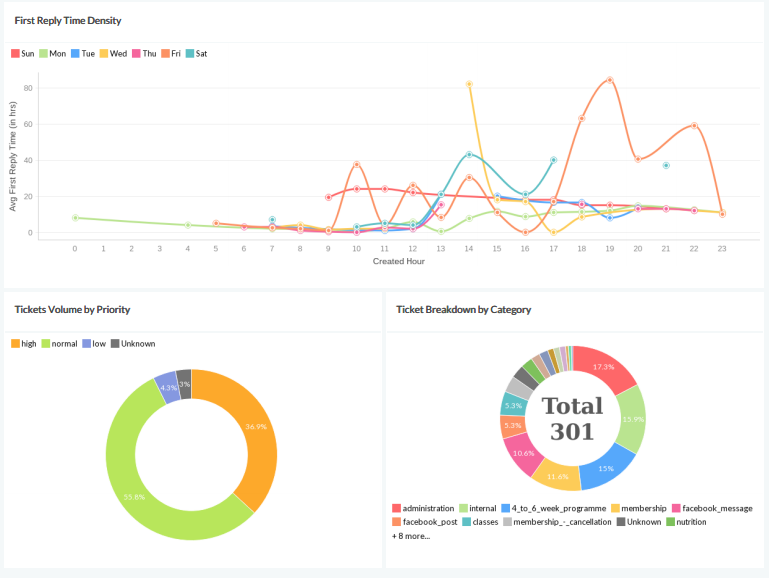
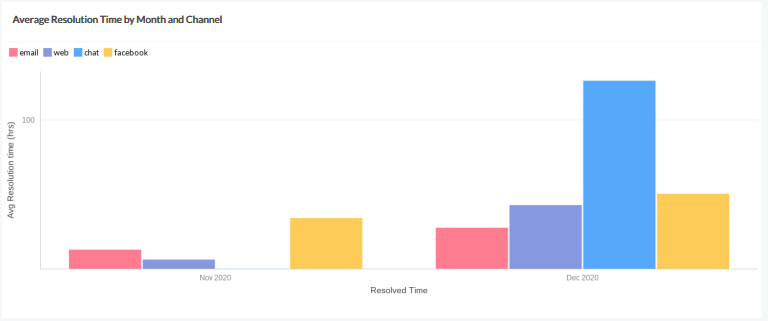
The key measures to review are SLAs and operational indicators this gives business insights. For example, it soon became apparent most questions and queries from customers arose between 10 am and 12 noon. So to be more customer focussed “chat” was introduced to cover this period.
Below is an example of the Operational dashboard we produced for the Gym.

If you need support with your implementation or would just like some advice please get in touch through our contact page.